How the Pinterest Algorithm Works in 2026: What Pinterest's Own Research Says

By Ruslan Saifullin, Pinterest analytics developer & founder of Pin Stats • Published November 18, 2026
Key takeaways
- How does the Pinterest algorithm work? It is several systems in a row. Pinterest reads each pin's image, text, boards and landing page, works out what each person is interested in, gathers a shortlist of pins saved to related boards, ranks that shortlist by what it expects the person to do, then filters out duplicates and low-quality content. Pinterest has published papers on each stage.
- What does Pinterest read to understand a pin? In its 2024 search paper: an AI-written caption of the image, the pin's title and description, the title and description of the page it links to, and the titles of the boards people saved it to. A separate model reads the image itself.
- Which actions count most? Saves count most in Pinterest's papers, ahead of clicks and of opening a pin to look closer, and its 2025 EU risk report says ranking favours saves over view time. Hides count against a pin. Pinterest's papers define a long click as over 10 seconds on the linked page; the 35 seconds often quoted has no Pinterest source we could find.
- Do new pins get a 7-day boost? No Pinterest source says so. Pinterest's help page says there is no set engagement window, and pins can pick up saves months later. Fresh pins do get found through the boards they are saved to, and Pinterest asks for original content weekly.
- What should I change after reading this? Keep each pin, its board and its landing page about the same thing. Name boards for one topic. When you want more reach for a page, make a new image for it; resaving the old pin works against you. Write pins that earn saves and real reads, since quick bounces count as neutral or negative, and judge them over weeks.
Most guides to the Pinterest algorithm quote precise numbers: a 35-second click, a 7-day window, a secret score for how well a pin matches its blog post. Ask where those numbers come from and the trail usually ends at another blog.
Pinterest has in fact published a lot about how its recommendations work. Its engineers have written peer-reviewed papers on the systems behind the home feed, search and related pins since at least 2017, and its 2025 risk report under the EU Digital Services Act describes in plain language what its ranking favours. With 661 million monthly active users in its third quarter of 2026, those systems decide what a lot of people see.
This guide goes through the algorithm stage by stage, citing what Pinterest itself has written. Where we draw a conclusion of our own, we say so. It then checks six popular claims against the sources and ends with a checklist, prompts for ChatGPT or Claude, and the full source list. If you only want the practical part, start at the checklist.
The algorithm at a glance
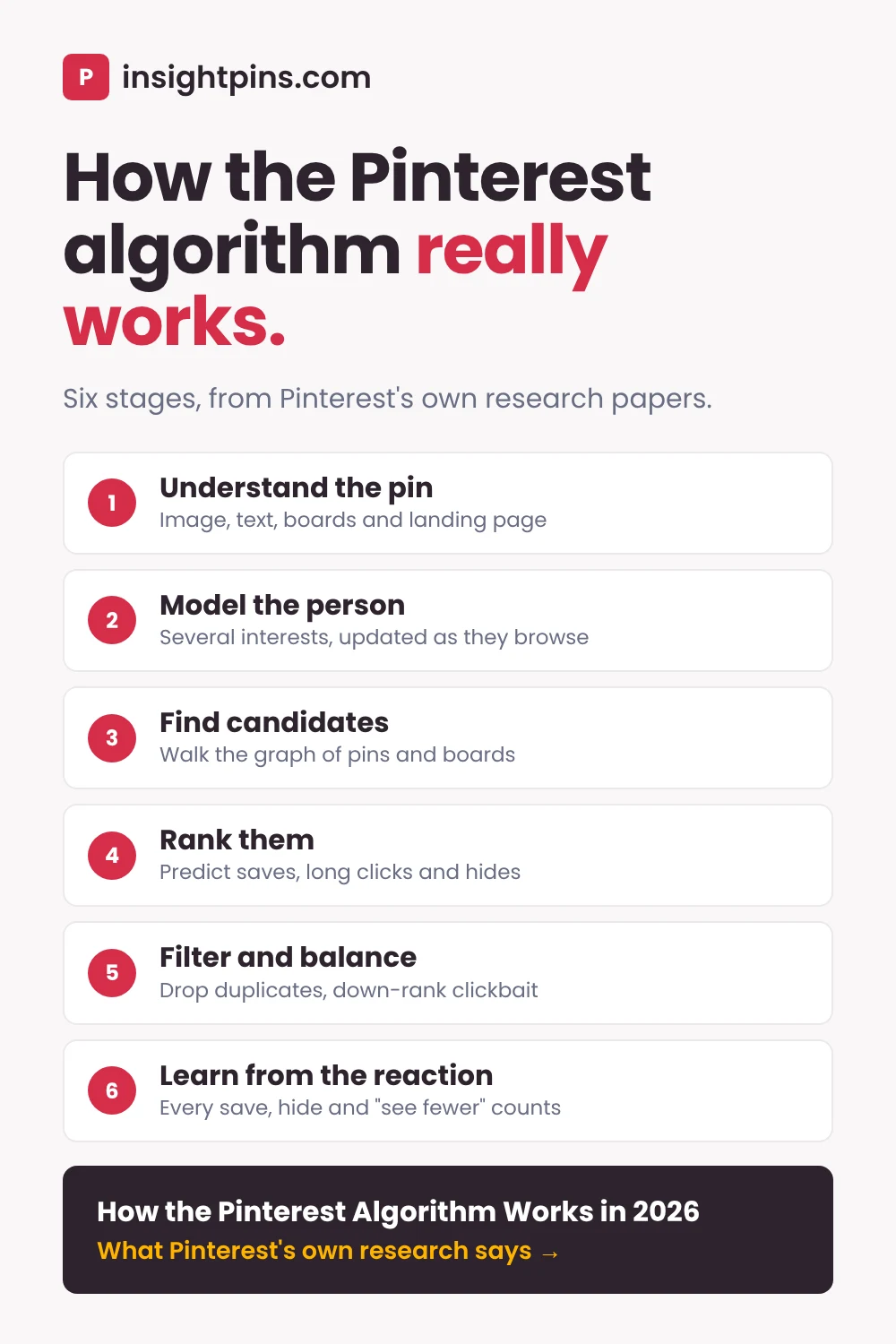
- Understand the pin Image, text, boards and the page it links to.
- Model the person Several interests per user, updated as they browse.
- Find candidates Walk the graph of pins and the boards they are saved to.
- Rank them Predict saves, clicks, close-ups and hides.
- Filter and balance Remove duplicates, down-rank clickbait, add survey signals.
- Learn from the reaction Every save, hide and "see fewer" feeds the next feed.
- What the Pinterest algorithm is, and where it shows up
- How Pinterest understands a pin
- How Pinterest models each person's interests
- How candidate pins are found: Pixie and the board graph
- How the Pinterest algorithm ranks pins
- What gets filtered out or held back
- How people's reactions change what they see
- Six Pinterest algorithm claims, checked
- What to do with this: a checklist
- How to see what the algorithm rewards in your niche
- How to apply this with ChatGPT or Claude
- Frequently asked questions
- Conclusion
- Sources
What the Pinterest algorithm is, and where it shows up
"The algorithm" is shorthand for several machine learning systems that run one after another. One set describes pins, another describes people, a third pulls a few thousand candidate pins out of billions, and a ranking model orders them. Filters and quality checks sit on top.
The same building blocks feed three places where your pins can appear, and each one starts from a different question:
| Surface | What starts it | What helps a pin show up there |
|---|---|---|
| Home feed | The person's recent saves, searches and browsing, plus the accounts, boards and topics they follow | Fitting one of their interests well enough that they save it |
| Search | The words someone types | Text and images that clearly match the query, and a page people stay on after clicking |
| Related pins (below an open pin) | The pin the person just opened | Being saved to the same focused boards as similar pins |
Pinterest's help page on recommended pins describes the home feed as a blend of pins picked for you and pins from the people, topics and boards you follow. Its recommendations page says they are based on your saves, searches and browsing activity.
Worked example · the sheet-pan dinner pin
This guide follows one illustrative pin: a vegetarian food blog publishes a pin for its post "15 Sheet-Pan Vegetarian Dinners" and saves it to a board called "Vegetarian Weeknight Dinners". The blog and pin are made up to show how each stage treats a pin; they are not a real account.
How Pinterest understands a pin
Before Pinterest can recommend a pin, it has to know what the pin is about. Its papers show it reads four kinds of evidence.
The image
Pinterest turns every image into an embedding, a list of numbers that places visually similar images close together. Its 2019 paper on visual search describes one shared embedding that replaced the separate ones its visual search products used to have. In the 2024 search relevance paper, an image-captioning model also writes a short text description of each image, so even a pin with no words on it has some text attached.
The pin's own text
The title and description are direct inputs in PinSage (2018) and in the 2024 search model, and later home feed models take them in through PinSage's embedding of each pin. None of the papers cited here lists the text overlaid on an image as an input of its own. Two of them treat text on the image as a quality problem: PinnerSage filters pins with a large amount of text in the image out of its candidate pool, and the near-duplicate paper says images with text overlay "often provide little value" in recommendations. Our reading is to put the words that matter in the title and description and keep the text on the graphic short.
The boards it is saved to
Every time someone saves a pin to a board, they label it. A pin saved to "Vegetarian Weeknight Dinners", "Meal Prep" and "Easy Family Meals" by different people has been described three times by humans. The 2024 search paper uses the titles of the boards a pin has been saved to as one of its relevance inputs, and Pixie, the system that gathers candidate pins, builds its graph from these saves.
The page it links to
The same search paper adds the linked page's title and description as an input and found that it improved accuracy. Its stated reason: Pinterest Search optimises for the "long click", when someone clicks through and stays on the page for over ten seconds.
Pinterest's distribution help page gives the practical version: make sure the images, text and keywords in your pin match the details in the landing page, and link to a page "clearly related to your Pin".
The interest taxonomy
All of this evidence gets mapped to interests. A 2019 paper by Stanford and Pinterest researchers describes the Pinterest taxonomy as a tree of about 11,000 interests. Both pins and people are placed into these interests, and the paper says they are used for content recommendation and ad targeting.
Worked example · what Pinterest reads
For the sheet-pan pin, Pinterest has: an image of roasted vegetables on a tray, a caption written from that image, the pin title "Sheet-Pan Vegetarian Dinners: 15 Easy Weeknight Recipes", the board title "Vegetarian Weeknight Dinners", and the post's own title and meta description. All five say the same thing. If the pin linked to the blog's homepage instead, the page evidence would say "food blog" and nothing more.
How Pinterest models each person's interests
The other side of the match is the person. Pinterest's PinnerSage paper (2020) explains why one profile per user does not work: someone who saves recipes, living room ideas and running shoes is not interested in the average of the three. So PinnerSage groups the pins a person saved or clicked in the last 90 days into separate clusters. The paper's own illustration: a light user might be represented by 3 to 5 clusters, a heavy user by 75 to 100.
Interests also move within a single visit. TransAct (2023), which runs in home feed ranking, reads each person's most recent 100 actions in real time, along with what kind of action each was. The paper notes that a pin the person saved matters more than one they only viewed, and a pin they hid should count as close to irrelevant. Adding this model raised home feed saves by 11% in Pinterest's online test.
In PinnerSage's design, each of a person's interests gets its own search for matching pins.
We infer from this that a pin which sits clearly in one interest has an obvious set of people to go to. A pin that is half recipe, half kitchen decor is a weaker fit for both groups.
How candidate pins are found: Pixie and the board graph
Ranking billions of pins for every request is too slow, so Pinterest first gathers a shortlist. The system its papers describe for this is Pixie, presented at the WWW conference in 2018. At the time, Pinterest said pins recommended by Pixie accounted for more than 80% of all engagement on the platform.
Pixie treats Pinterest as a graph of pins and boards, with a link wherever someone saved a pin to a board. To find pins for a person, it starts from pins they recently engaged with and takes many short random walks: pin to board, board to another pin, and so on. Pins the walks reach often become candidates. It also recommends boards and serves the new pins saved to them, which is one way a fresh pin reaches people before it has much history of its own.
Why focused boards matter
The Pixie paper says two things about boards:
- The walk favours smaller boards, because they "tend to be more topically focused".
- Before building the graph, Pixie scored each board on how many topics its recent pins covered and removed the most mixed boards along with all their links (the most diverse 10% in the paper's test). It also dropped links where a very popular pin had been saved to a board on an unrelated topic. Pruning made recommendations 58% more relevant in their tests.
That is a 2018 description, and Pinterest has not said whether today's graph prunes boards the same way. The reasoning still holds: a board called "Stuff I Love" with recipes, quotes and outfits on it tells the graph little about any of its pins, and in Pixie's design it was the kind of board that got dropped.
How the Pinterest algorithm ranks pins
Once there is a shortlist, a ranking model scores each candidate for this person, right now. Pinterest's papers describe the home feed model, called Pinnability, as predicting several actions at once, both positive and negative: the TransAct paper names click, repin (its word for saving a pin) and hide. The final order comes from combining those predictions.
Which actions Pinterest treats as good
| Action | What Pinterest's sources say | Source |
|---|---|---|
| Save | Called "the strongest indicator" that a pin was relevant; ranked first in training data for related pins | TransAct, 2023; Related Pins, 2017 |
| Long click | A click to the linked page lasting over 10 seconds; "a key metric optimized for Pinterest Search" | PinnerFormer, 2022; search relevance, 2024 |
| Long close-up | Opening a pin and looking at it for over 10 seconds counts as positive engagement in home feed modelling | PinnerFormer, 2022 |
| Click and close-up | Positive but weaker; ranked below saves and long clicks. A close-up is tapping a pin open to see it larger | Related Pins, 2017 |
| Short click | Treated as neutral or negative: the person came straight back | PinnerFormer, 2022 |
| Hide | Negative; a hidden pin's relevance "should be very low" | TransAct, 2023 |
Two versions of the ranker in the 2017 Related Pins paper trained on this order: save, then long click, then click, then close-up, then impression (the pin was only shown). The next version trained on saves alone, saved or not saved. Pinterest has not published the weights its live models use.
The 2025 DSA report says the same in plain words: Pinterest's recommenders "prioritise high-quality content, rather than optimising for view time", and they are tuned to favour explicit signals "like 'saves'" over views alone.
How search ranking differs
Search adds a relevance check between the query and each pin. The 2024 paper describes a large language model that grades how well a pin matches a search on a five-level scale. That model is too slow to run on every search, so Pinterest uses its grades to train a smaller, faster one. Its inputs are the four kinds of evidence above (image caption, pin text, linked page, board titles) plus the searches the pin had already done well on, and each one improved accuracy as it was added. When human raters scored results for 300 real queries, ranking with the new model was 2.18% more relevant.
Worked example · two versions of the same pin
Picture two pins for the sheet-pan post. Pin A says "You won't believe dinner #7!" and links to the post. People click out of curiosity and many come straight back: short clicks. Pin B says "15 sheet-pan vegetarian dinners, 30 minutes each". Fewer people click, but those who do stay to read, and more save it for later. Pin B earns the signals the table above ranks highest.
What gets filtered out or held back
After ranking, several published systems remove or demote pins before anyone sees them.
Near-duplicate images
Pinterest's near-duplicate detection paper (WWW 2020) describes a system that groups visually near-identical images across billions of pins. It found about 900 million clusters, holding about 64% of the images it checked. The paper says Pinterest uses these clusters to filter duplicated content out of search results and the home feed, and that near-duplicates are merged into a single node in the recommendation graphs.
So uploading the same image again, or a lightly cropped copy, mostly adds another member to an existing cluster. Pinterest's help page puts it more bluntly: "Try not to repeatedly save the same Pins or upload content that already exists on Pinterest", and warns that you may be flagged as spam and temporarily blocked from creating pins.
Clickbait and quality
The 2025 DSA report says Pinterest's models de-emphasise clickbait and shocking content, and down-rank content that breaks no rule but could be harmful. It also says Pinterest uses non-engagement signals, such as in-app surveys and manually labelled quality assessments, that "provide a balance to engagement signals" in ranking. They can catch a pin that people click on but say they did not want.
AI-generated images
Since April 2025 Pinterest labels images it detects as AI-generated or AI-modified, from image metadata and its own classifiers, and offers an appeal. In October 2025 it added a setting that lets people see less AI content in categories such as beauty, art, fashion and home decor, and added food and drink in December 2025. Pinterest has not said it down-ranks labelled pins as such, but some of the people you want to reach may have asked to see fewer of them.
How people's reactions change what they see
The loop closes with the person. On the home feed, people can choose "See more like this" or "See fewer like this" on a pin, hide it, see why it was recommended, and unfollow the board, topic or account it came from. Under Refine your recommendations in Settings, they can switch off recommendations based on pins they engaged with, and turn down AI content by category. People in the EU can also opt out of personalised recommendations that use inferred signals about them.
Each of these is a signal too. A hide is one of the negative actions the ranking models predict, and the DSA report commits Pinterest to expanding the see more and see fewer controls.
Six Pinterest algorithm claims, checked
These claims circulate widely in Pinterest marketing guides. Here is what Pinterest's own sources say about each one.
| Claim | What Pinterest has published | Verdict |
|---|---|---|
| A long click is 35 seconds or more | Its 2022 and 2024 papers both define a long click as over 10 seconds on the linked page. We found no Pinterest source for 35. | Wrong number |
| New pins get a 7-day boost, then fade | The Pixie paper has no such window; its graph is rebuilt daily. The help page says there is no set engagement window. | Unsupported |
| Pinterest scores how well a pin matches its blog post | No such score has been published. The search model does read the linked page's title and description, and Pinterest's guidance asks for pins that match their page. | The name is made up; the advice is sound |
| Mixed-topic boards get ignored | Pixie (2018) removed the most topically diverse boards from its graph, 10% in the paper's test. Whether the current graph does the same is not public. | True in 2018; likely still worth acting on |
| Saves matter more than clicks | Ranked first in the 2017 Related Pins training order, called the strongest indicator in 2023, and named in the 2025 DSA report as preferred over views. | Supported, with no published weights |
| Resaving your old pins brings them back | Near-duplicates are clustered and filtered from search and the home feed, and repeated saving of the same pins can get an account flagged as spam. | Works against you |
Checked against the sources listed at the end of this guide, November 2026.
What to do with this: a checklist
None of the papers tells you how to pin. These seven steps are our reading of them, and the example after the list shows the same pin set up both ways.
- Make all the text agree. The pin title, description, board name, and the landing page's title and meta description should describe the same thing in similar words. That is most of what the search model reads.
- Link to the exact page. Link the post the pin is about, never your homepage, and check how fast it loads: Pinterest's distribution help page asks for under four seconds.
- Keep boards to one topic. Name them with the phrase people search, and save each new pin first to the board it fits best.
- Publish new images. A new angle on a page is a new pin, while the same image uploaded again joins a duplicate cluster.
- Earn the save and the read. Promise something specific and deliver it on the page. Curiosity headlines buy short clicks, which count as neutral or negative.
- Describe the image in words. Pinterest writes its own caption of your image, but your title, description and alt text are what you control.
- Be patient. There is no engagement window to beat. Judge a pin over weeks, and compare pins of similar age.
Hard for the algorithm to place
- Board: "Yummy!!" - Recipes, quotes and outfits on one board
- Title: "You need to try this" - No words a searcher would type
- Links to the blog's homepage - The page says nothing about sheet-pan dinners
- The same image resaved every month - Clustered as a duplicate
Easy to place
- Board: "Vegetarian Weeknight Dinners" - One topic, named as people search it
- Title starts "Sheet-Pan Vegetarian Dinners" - Matches the image and the post
- Links to the post itself - Its title and description say the same thing
- New images for new angles - Each one a fresh pin
Illustrative example, not data from a real account.
How to see what the algorithm rewards in your niche
You cannot see Pinterest's model, but you can see its output. Search the phrase you want to rank for and look at what comes up: those pins are what search ranking currently prefers for that query.
- Check the phrase first. Type it into Pinterest search: if autocomplete offers it, or longer versions of it, people are searching for it. For a number, look up its search volume in the free Pinterest keyword tool. A phrase nobody searches will not bring searchers however well the pin is set up.
- Read your own pins in Pinterest Analytics. It shows impressions, saves and outbound clicks for pins you own, and you can sort, filter by date and export them. Look for pins with a high save rate relative to their impressions.
- Read the pins that rank. Open the top pins for the search one at a time and note their saves. The free Pin Stats extension shows saves, repins and comments on every pin in the results as you scroll, so you can skip opening each one and see which formats and angles collect saves for that search.
How to apply this with ChatGPT or Claude
Neither ChatGPT nor Claude knows how Pinterest's live ranking works; they know the same public papers this guide cites, and they can repeat the same myths with confidence. Neither can see your Pinterest data unless you paste it in. What they do well is the checking work above: comparing a pin's text against its landing page, sorting a mixed board into focused ones, and finding patterns in an export.
ChatGPT or Claude: which to use for each job
| Job | ChatGPT | Claude | Pick |
|---|---|---|---|
| Check a pin's text against its landing page | Yes, from a URL or pasted text | Yes, from a URL or pasted text | Either |
| Split a mixed board into focused boards | Yes, from a pasted list of pin titles | Yes, from a pasted list of pin titles | Either |
| Find patterns in a CSV of pins and their saves | Yes, from an uploaded CSV | Yes, from an uploaded CSV | Either |
| Make new pin images for fresh angles | Built-in image generation | No built-in image generation; works through design connectors such as Canva | ChatGPT |
| Tell you how Pinterest ranks your pins | No; it has no access to Pinterest's models | No, same | Neither |
Assistant features as of November 2026, when we last checked them. Both change often.
Use the one you already pay for. Choose ChatGPT if you also want it to draft the new images, and label AI images honestly when you publish them.
Three prompts to copy
Replace everything in square brackets. Each prompt works in either assistant.
Here is a Pinterest pin and the page it links to.
Pin title: [title]
Pin description: [description]
Board name: [board]
Text on the image: [overlay text]
Landing page title and meta description: [paste]
Landing page text: [URL or pasted text]

1. In one sentence each, say what the pin promises and what the page delivers.
2. List every place where the words differ in meaning (not just wording), quoting both.
3. Rewrite the pin title (up to 100 characters) and description (up to 500 characters; Pinterest allows 800, but aim shorter) so they describe exactly what the page delivers, using the main phrase "[main keyword]" near the start of the title.
Do not promise anything the page does not contain. Count the characters of your title and description and fix any that run over.Below are the titles of the pins on my Pinterest board "[board name]".
Group them into focused boards, each about one topic a person would search for on Pinterest.
For each group give: a board name of up to 50 characters, a one-sentence board description, and the pin titles that belong in it.
Use only the pin titles I gave you. Put any pin that fits no group in a list called "Does not fit". Do not invent search volumes; I will check the board names myself.
Pin titles:
[paste one per line]Attached is a CSV of the pins Pinterest shows for the search "[search phrase]", with each pin's title, saves, repins, comments and creation date.
1. Calculate saves per month since creation for each pin, and list the top 10 by that figure.
2. For those 10, describe what they have in common: format (list, how-to, single photo, infographic), headline angle, and words used in the title.
3. Compare them with the 10 lowest pins by the same figure.
4. Suggest 3 pin angles for my page "[page title]" that follow the pattern without copying any pin.
Use only the numbers in the file. Say if the sample is too small to show a pattern.Prompt, project or skill: which to set up
- A prompt is enough to audit one pin or clean up one board. Copy one of the three above.
- A project, in either assistant, suits a monthly review. Put your board list, your main keywords and a few of your best pins in it once, then paste each month's new pins for a check against the list above.
- A Claude skill helps when output has strict rules. If you publish in batches, our free Pinterest bulk CSV skill builds and checks the upload file. Skills work on any Claude plan, the free one included, once code execution is turned on.
Where Pin Stats fits
Prompt 3 needs data. You can build the CSV by hand: open each top pin for the search and copy its title, saves and date into a spreadsheet. With the free Pin Stats extension you can read the saves, repins and age of the pins in a search as you scroll instead. On Pin Stats Pro you can export the whole table as a CSV and attach it. Pin Stats shows public engagement only; your own impressions and clicks are in Pinterest Analytics.
Frequently asked questions
Does Pinterest favour new pins?
Pinterest asks for fresh, original content and says to aim for new pins weekly, and its Pixie system surfaces new pins through the boards they are saved to. It has published no fixed boost period, and its help page says pins have no set engagement window: a pin can be found months after you publish it.
How long is a long click on Pinterest?
Over 10 seconds on the linked page, in the two Pinterest papers that define it (2022 and 2024). The 35-second figure in some guides has no Pinterest source we could find. Engineers used the threshold to mark good visits when training models, so the practical advice is the same either way: link to a page that delivers what the pin promised.
Does saving the same pin many times help?
No. Pinterest groups near-identical images into clusters and filters duplicates out of search and the home feed, and its help page warns that repeatedly saving the same pins can get you flagged as spam. Make a new image when you want another angle on a page.
Do AI-generated pins get less reach?
Pinterest has not said it down-ranks them. Since 2025 it labels images it detects as AI-generated or modified, and people can ask to see less AI content in categories such as beauty, art, fashion, home decor and food. Some of your audience may have turned that on.
Can people turn off Pinterest's personalised recommendations?
Partly. Anyone can switch off recommendations based on pins they engaged with, hide pins and choose "See fewer like this". In the EU, people can also opt out of personalisation that uses inferred signals such as past clicks and search history.
Can ChatGPT or Claude tell me how the Pinterest algorithm ranks my pins?
No. They have no access to Pinterest's models or your account data, and they often repeat popular myths. They are useful for checking that a pin, its board and its landing page say the same thing, and for finding patterns in engagement data you export and attach.
Conclusion: what Pinterest's research means for your pins
Pinterest's published research is more consistent than the folklore around it. The systems read a pin from its image, text, boards and landing page, match it to one of a person's interests, reward saves and long reads, and filter out duplicates and clickbait.
Start with your five best pages. For each, check that the pin title, board name and page title say the same thing, move the pin to a focused board if it sits on a mixed one, and make one new image for an angle you have not used. Compare those pins with your older ones in three or four weeks.
Sources
Pinterest's papers, in the order this guide uses them. Each describes the system at the time of writing.
- Pinterest Digital Services Act Risk Assessment and Mitigation Report, 2025: ranking priorities, non-engagement signals, user controls.
- Pin performance and distribution, Pinterest Business help: matching landing pages, page speed, weekly original content, spam warning, no set engagement window.
- Learning a Unified Embedding for Visual Search at Pinterest, KDD 2019.
- Improving Pinterest Search Relevance Using Large Language Models, CIKM 2024 workshop on industrial recommender systems.
- Graph Convolutional Neural Networks for Web-Scale Recommender Systems (PinSage), KDD 2018.
- Use of OWL and Semantic Web Technologies at Pinterest, 2019: the interest taxonomy.
- PinnerSage: Multi-Modal User Embedding Framework for Recommendations at Pinterest, KDD 2020.
- TransAct: Transformer-based Realtime User Action Model for Recommendation at Pinterest, KDD 2023.
- Pixie: A System for Recommending 3+ Billion Items to 200+ Million Users in Real-Time, WWW 2018.
- PinnerFormer: Sequence Modeling for User Representation at Pinterest, KDD 2022: the 10-second long click and close-up.
- Related Pins at Pinterest: The Evolution of a Real-World Recommender System, WWW 2017: the order of engagement actions.
- Evolution of a Web-Scale Near Duplicate Image Detection System, WWW 2020.
- Pinterest Newsroom: Gen AI labels (April 2025) and controls for GenAI content (October 2025).
- Pinterest help: Refine your recommendations and See more or fewer recommended Pins.
Next step: Pick the phrase you most want to rank for and check its volume in the free Pinterest keyword tool.
Then see which pins the algorithm already favours for it. Add Pin Stats to Chrome - Free and read the saves on every pin in the results as you scroll.