See What's Really Working on Pinterest
See saves and engagement on every pin — right inside Pinterest. Analyze competitor strategies, track engagement trends, and download media in full quality. Free Chrome extension with 10,000+ users on the Chrome Web Store.
Works with Chrome, Edge & Brave
On the Chrome Web Store you’ll find us as “Pinterest Pin Stats – Sort Pins”.


Pinterest Doesn't Show You the Full Picture
Pinterest's built-in analytics only scratches the surface. If you've ever wondered why some pins take off while others stall, you're not alone.
Hidden Engagement Data
You can't see saves, repins, or likes on individual pins as you browse. Pinterest Analytics covers only pins you own; on anyone else's, you open each pin to see its numbers.
No Way to Sort or Compare
Pinterest Analytics sorts your own top pins. It gives you nothing for anyone else's, so comparing pins across a niche means scrolling and guessing.
Competitor Blind Spots
You can see what competitors post, but not how well it performs. Their strategy is a black box.
No Bulk Analysis
Outside your own account, analyzing 100 pins means clicking into each one individually. That's hours of manual work.
Pin Stats fixes all of this — directly inside Pinterest, with zero setup.
What Pin Stats Reveals
Everything Pinterest analytics should be — but isn't
See What Pinterest Hides — Saves, Repins, and Likes on Every Pin
Pinterest Analytics only covers pins you own, and on anyone else's pins Pinterest shows engagement one pin at a time, when you open it. Pin Stats overlays engagement metrics directly on every pin as you browse: saves, repins, likes, comments, and shares. No dashboard switching. No manual lookups.
Works on your own pins, competitor pins, and any public pin on Pinterest.
See which stats it revealsAnalyze Data in Detailed Tables
Stop scrolling through hundreds of pins hoping to spot a pattern. Pin Stats opens a sortable data table for any Pinterest board, search result, or profile. Filter by content type and compare pins side by side.
Want the top 10 most-saved pins on a competitor's board? Sort by saves. Want to see which of the pins you published last month have the most saves so far? Filter by creation date, then sort (both with Pro). Save counts are lifetime totals, so this ranks pins by everything they have earned, not by saves gained during the month.
See how data tables workDecode Competitor Ad Strategies — See What Promoted Pins Actually Get
Wondering how your competitors' Pinterest ads are performing? Pin Stats reveals engagement data on promoted pins that Pinterest keeps hidden. See saves, repins and comments on any ad in your feed.
Use this data to benchmark your own ad performance, identify winning ad formats, and build better Pinterest ad campaigns with real competitive intelligence.
See how ad analysis worksDownload Any Pinterest Image or Video at Full Resolution
Save Pinterest images and videos at their original quality — no compression, no screenshots. One click to download any pin's media for mood boards, content inspiration, or creative reference.
Supports all pin formats: standard images, video pins, idea pins, and carousel pins.
See how media download worksWhat the numbers are: Pin Stats reads the engagement figures Pinterest already publishes on a pin — saves, repins, likes, comments — plus board, pinner, creation date, pin type and, on promoted pins, the advertiser and campaign fields. It does not measure clicks, sessions, revenue or conversions, and it never touches your Pinterest account data. Use it to see what got engagement; pair it with your own site or store analytics for what happened after the click.
See It Before You Install
Real screens from the extension — not mockups
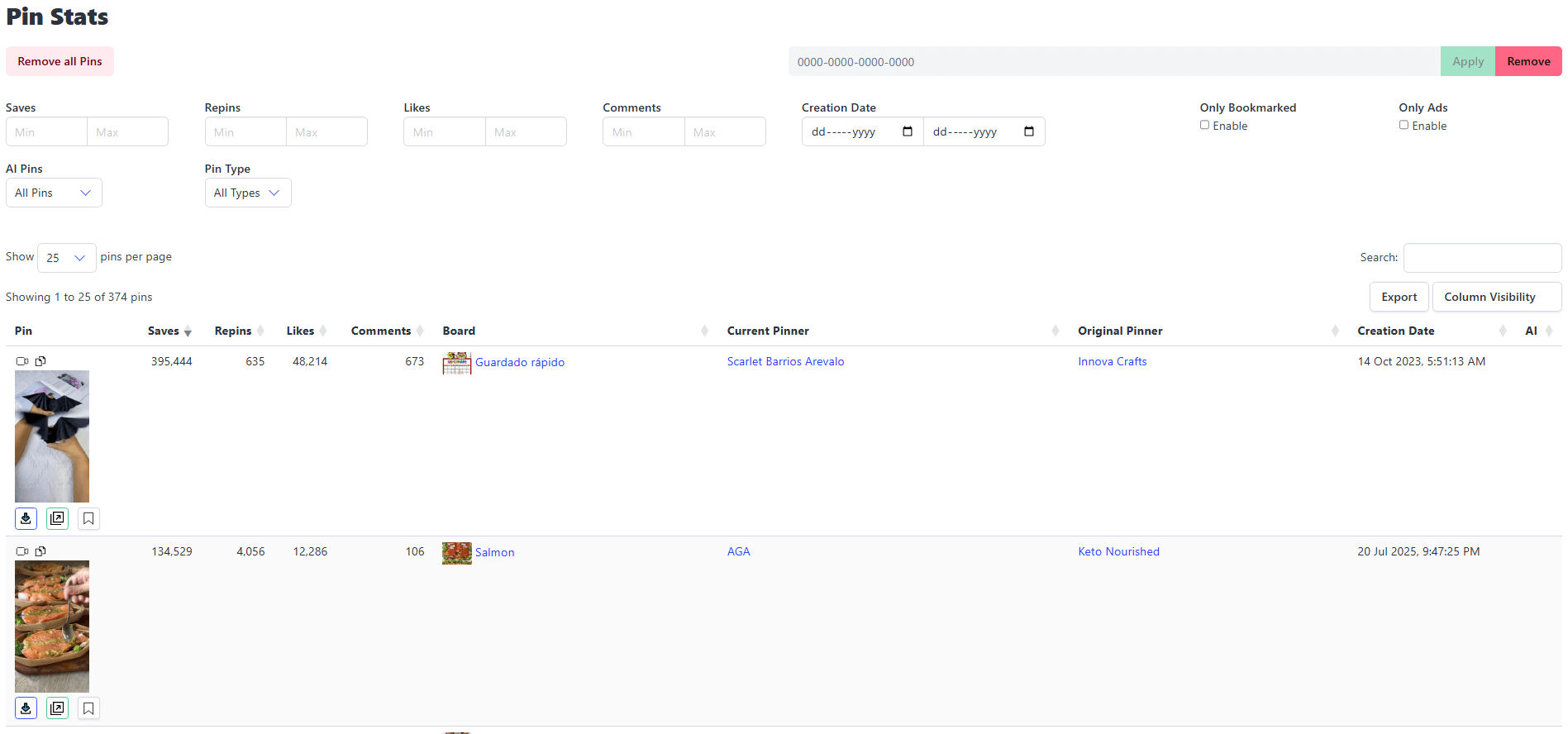
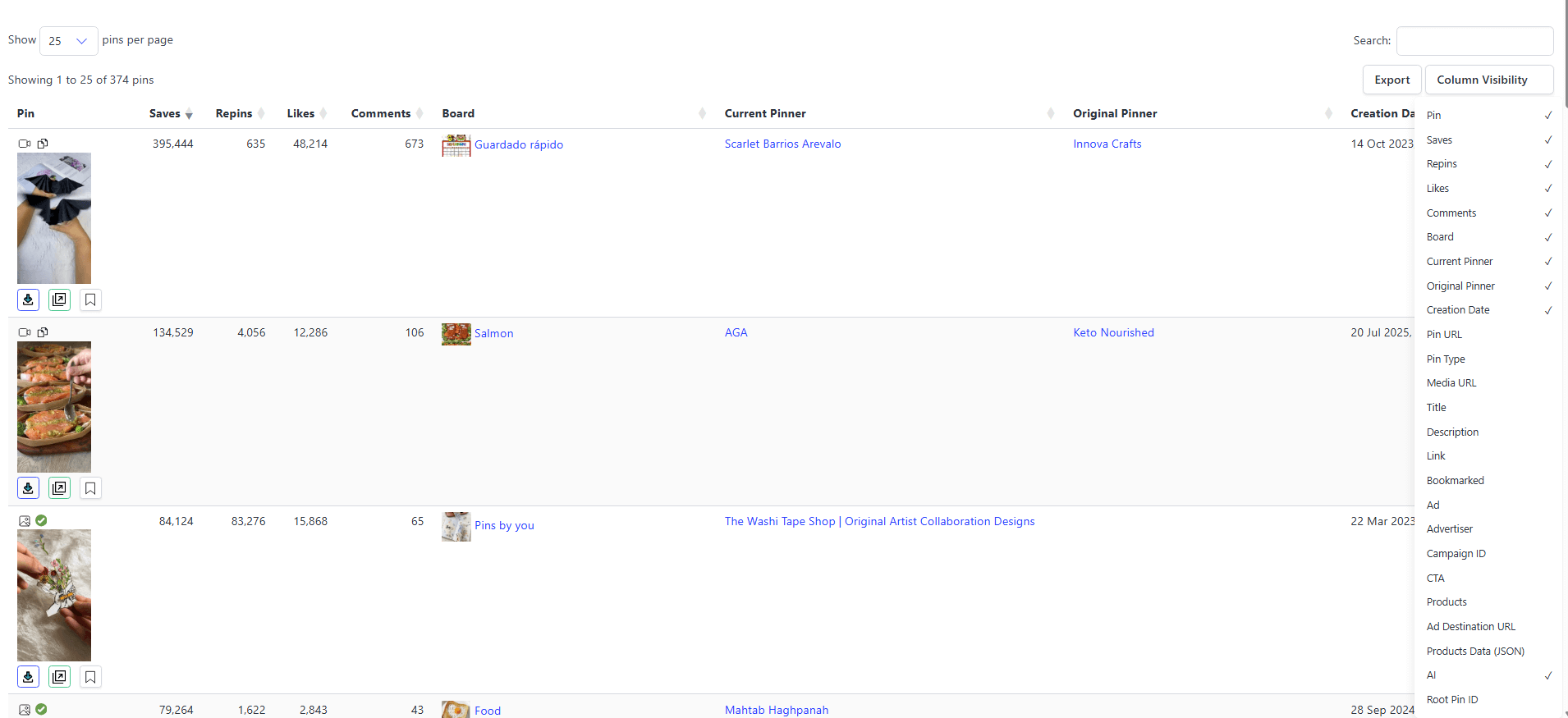
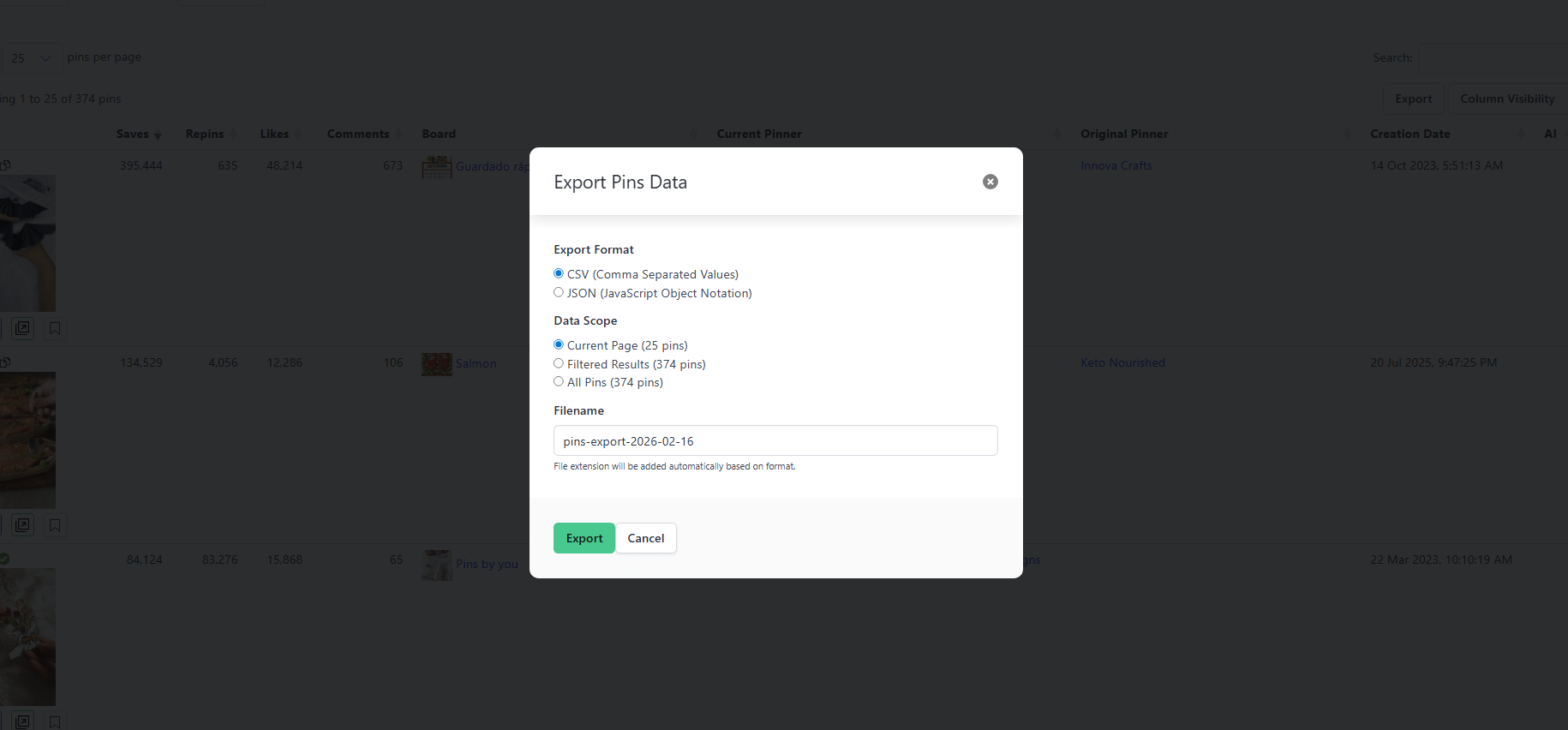
Prefer to watch it run? There is a short demo and the full interface walkthrough on the features page.
Up and Running in 30 Seconds
No setup, no account creation — just install and go
Install the Extension
Click "Add to Chrome" — it's free and takes one click. No account creation required.
Browse Pinterest as Usual
Open Pinterest and start browsing. Pin Stats automatically displays engagement metrics — saves, repins, comments — directly on every pin you see.
Analyze, Sort, and Optimize
Open the Pin Stats data table to view detailed analytics for any board or search result. Spot trends, find winning content, and refine your strategy with real data.
Built for Anyone Who Takes Pinterest Seriously
Whether you're a solo creator or a large agency, Pin Stats gives you the data edge
Pinterest Creators & Bloggers
See which of your pins collect the most saves, repins and likes. Sort any board by engagement to spot the formats and topics worth repeating, instead of guessing from a scroll.
E-commerce Brands & Shopify Stores
Track which product pins collect the most saves and repins, and identify the visuals behind them so you can replicate the format across your catalog. Saves are an interest signal, not a purchase — pair them with your own store analytics to close the loop.
Marketing Agencies
Analyze client Pinterest accounts in minutes, not hours. Export engagement data to CSV or JSON for reports and benchmark a client's pins against competitors with numbers rather than screenshots.
Affiliate Marketers
Discover which Pinterest niches and pin styles get the most engagement. Analyze top-performing affiliate pins in any category before you create your own.
What You Get with Pin Stats vs. Pinterest Alone
See exactly what Pin Stats adds to your Pinterest workflow
| Feature | Pinterest Analytics (Native) | Pin Stats Extension |
|---|---|---|
| See pin saves, repins, likes | Your own pins in the dashboard; anyone else's one pin at a time | Directly on every pin as you browse |
| Sort pins by engagement | Your own pins only | Detailed data tables with filtering and export |
| Analyze competitor pins | Not available | Full engagement data on any public pin |
| Bulk pin analysis | Your own pins only | Data table with filtering and sorting |
| Analyze promoted/ad pins | Limited to your own ads | See engagement data on any promoted pin |
| Download pin images/videos | Not available | One-click download at full resolution |
| Export data | Limited CSV from business dashboard | Export to CSV/JSON with sortable columns |
| Works while browsing | Separate analytics dashboard | Integrated overlay — no tab switching |
See pin saves, repins, likes
Sort pins by engagement
Analyze competitor pins
Bulk pin analysis
Analyze promoted/ad pins
Download pin images/videos
Export data
Works while browsing
Pinterest Analytics sorts and exports engagement for pins you own; on anyone else's pins it shows engagement one pin at a time. Pin Stats puts the same public numbers on every pin you browse — yours or anyone's — in a table you can sort, filter and export. Reading the pattern is still your job; the point is that you can finally see it.
Your Data Stays Private. Always.
We know that installing a browser extension requires trust. Here's our commitment:
No Pinterest Login Required
Pin Stats reads publicly available data. We never ask for your Pinterest password or access your account.
No Data Selling. Ever.
Your browsing data is never sold, shared, or used for advertising. Period.
Minimal Permissions
We only request the permissions strictly needed to show pin stats. Nothing more.
Transparent Privacy Policy
Read exactly what we collect and why. No legal jargon, no surprises. Read our Privacy Policy.
10,000+ Chrome Web Store Users
Rated 4.7 out of 5 from 23 ratings on the Chrome Web Store. Both figures are the ones the store shows publicly — check them yourself on the listing.
Find the keywords people actually search for
Keyword Explorer turns one seed into a full map of Pinterest keywords with real search volumes — right inside your browser.
- Real Pinterest search volumes, not third-party guesses
- One seed keyword expands into a full keyword map
- Spot trending ideas and the questions pinners ask
- Runs in Chrome — no separate app, no API keys
Want a taste first? Check any keyword's volume with the free Pinterest keyword tool.
- Live pin stats on every pin — unlimited pins
- Sort by likes, comments or creation date only
- Full-resolution media downloads
- Basic filters: saves, repins, bookmarked pins
- No advanced filters, CSV/JSON export or ad columns
- Keyword Explorer — preview only (results locked)
- Everything in Free
- Sort by any column + advanced filters
- Data export (CSV/JSON)
- Ad insights — advertiser, campaign, CTA
- Hide AI-generated & ad pins
- One personal license for all your own devices
- Priority support
- Keyword Explorer — preview only
- Everything in Pro
- Full Keyword Explorer access
- All search volumes unlocked
- Drill into any keyword, expand long tails
- CSV export of keyword research
Taxes may apply, depending on your location.
14-day money-back guarantee for all paid plans.
If you're not completely satisfied with Pin Stats, simply contact our support team within 14 days of
purchase
Need More? Let's Talk!
We offer custom solutions tailored for larger teams, agencies, or enterprises.
Get in touch to discuss your specific needs and receive a personalized quote.
What Our Users Say
Join thousands of Pinterest creators who trust Pin Stats
Frequently Asked Questions
Got questions? We've got answers
How do I install the Pin Stats extension?
Is my Pinterest account data secure?
Can I use Pin Stats with business accounts?
How often is the extension updated?
Can I get a refund if I'm not satisfied?
Is Pin Stats safe to use? Will it affect my Pinterest account?
Does Pin Stats slow down Pinterest?
What's the difference between the free and paid versions?
What's the difference between Pro and Extended Pro?
Does Pin Stats work with Pinterest business accounts and personal accounts?
Can I use Pin Stats on browsers other than Chrome?
How is Pin Stats different from Pinterest's built-in analytics?
Do you offer team or agency plans?
Start Tracking Your Pinterest Performance Today
Join the 10,000+ Chrome Web Store users who run Pin Stats to grow with data, not guesswork.
Free to install. No account required. See results in seconds.
Install Pin Stats Free — Chrome Web StoreWorks with Chrome, Edge, and Brave browsers. Free plan available forever.