Best Pinterest Chrome Extensions in 2026: The Complete Guide

By Ruslan Saifullin, Pinterest analytics developer & founder of Pin Stats • Published August 24, 2026 • Updated October 5, 2026
Key takeaways
- Which Pinterest Chrome extensions are worth installing in 2026? Three, each doing a different job: Pinterest Pin Stats & Sort for hidden engagement data and sorting (ours), the official Save to Pinterest button for one-click web curation, and the Tailwind Publisher extension for bulk scheduling. Overlapping analytics extensions add clutter rather than insight.
- What do they actually cost? Pin Stats is free for live stats, basic sorting and downloads; Pro is $21 a year and Extended Pro $72 a year. Save to Pinterest is free. Tailwind’s extension is free, but new accounts get only a one-time trial of 10 scheduled pins. Its Pin Scheduling & Creation plan is $17.99 a month billed annually, or $29.99 billed monthly, per Pinterest account.
- Why can’t I see save counts on other people’s pins? Pinterest’s public interface drops them. On a pin you did not create there is no save count, repin count, comment count or publication date, and like counts were removed years ago. Pinterest’s own analytics report those numbers only for accounts you own, and on a delay.
- Is an extension that reads pin stats doing anything shady? No. Every metric in this guide is data Pinterest already sends to your browser when it renders a pin; the extension displays it instead of discarding it. Nothing here involves logging into another person’s account or reading private data.
- How do I vet an extension before installing it? Check the permission scope first — a Pinterest analytics tool needs pinterest.com and little else. Never type your Pinterest password into an extension popup. Prefer tools that process data in your browser, and read the listing’s update date and developer before trusting it with a logged-in session.
Ever opened a competitor's board, seen one pin that clearly took off, and had no way to prove it? Pinterest shows you the image and the title — not how many people saved it, when it was published, or whether it was promoted.
With the platform at a record 640 million monthly active users in Q2 2026, up 11% year over year (Pinterest Q2 2026 results, SEC filing), the accounts winning your keywords are the ones reading data everyone else is guessing at. Browser extensions close that gap — here are the three worth a permanent toolbar slot, what each actually costs, and which tier a given feature lives in.
TL;DR: The 2026 Pinterest Extension Stack
- Research and analytics: Pinterest Pin Stats & Sort surfaces the engagement numbers Pinterest keeps off the public pin card — saves, repins, likes, comments and creation dates — and collects them into a sortable table you can filter and export. Full disclosure: this one is ours.
- Web curation: the official Save to Pinterest button, for pinning images from any site straight to a board.
- Scheduling: the Tailwind Publisher extension, for grabbing several images from one page and queueing them.
- The honest part on cost: Pin Stats is free for reading stats and basic sorting; export, advanced filters and the AI/ad filter are Pro ($21/year). The Save button is free. Tailwind's extension is free, but new accounts get only a one-time trial of 10 scheduled pins — real volume starts at $17.99 a month per Pinterest account, billed annually.
What Pinterest Hides, and Why an Extension Helps
Pinterest's public interface is deliberately quiet about numbers. On a pin you did not create, you cannot see the save count, the repin count, the comment count, or the publication date. Like counts were removed from the public interface years ago. What remains is the image, the title, and the account that posted it.
Pinterest's own analytics dashboard does report those metrics — but only for pins on accounts you own, and on a reporting delay. That is a reasonable product decision and a genuine problem for anyone doing research: the pins most worth learning from are, by definition, someone else's.
That is the entire category. A Pinterest extension is worth installing when it does one of three things: reveals data the interface drops, removes friction from a repetitive action, or moves work out of Pinterest into a tool that handles volume better. The three tools below are one of each.
Top Pick: Pinterest Pin Stats & Sort
Working out why a competitor's pin took off used to mean opening pins one at a time and guessing. Pin Stats turns a search results page, a board, or a profile into something closer to a queryable table.
This is our own extension, so treat the recommendation with the scepticism it deserves — the feature list below is written so you can check every line yourself against the full feature list and the plan comparison before installing anything.
What it does
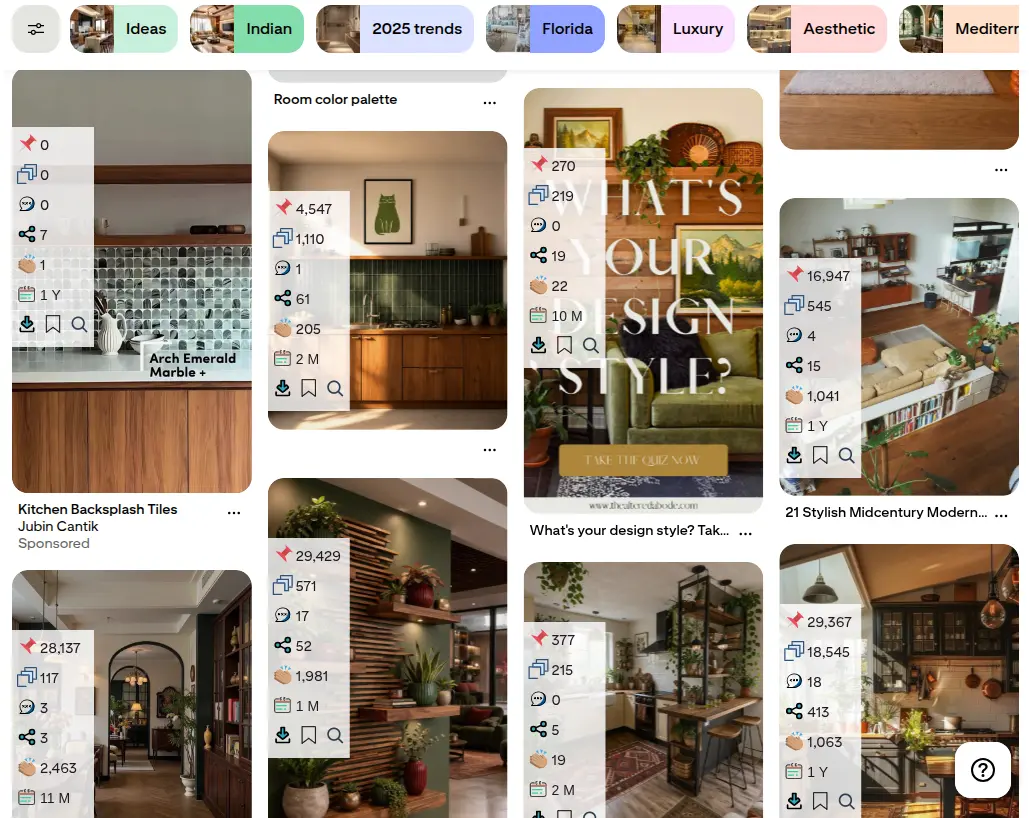
- Hidden stats on every pin card. Saves, repins, likes, comment counts and the creation date appear directly on the pins as you scroll — on any pin, not just your own. Included in the free version.
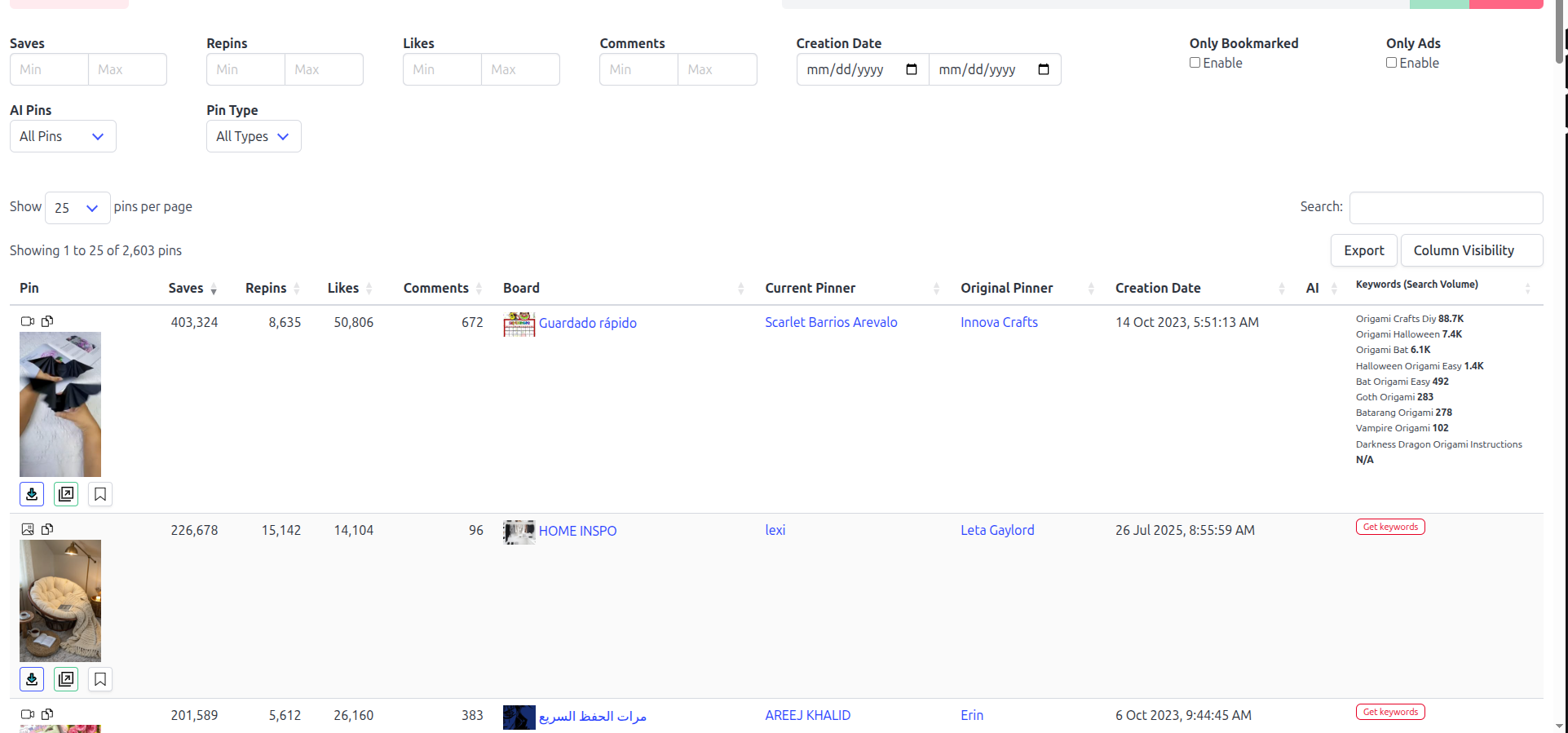
- A sortable data table for any board, search result, or profile. Pins you browse are collected automatically into a table you can sort and search. Sorting by likes, comments and creation date is free; sorting by any column is Pro.
- Advanced filters. Narrow by minimum or maximum saves, likes, comments, date range, pin type, ads, or AI pins — useful for cutting a 400-pin board down to the fifteen that matter. Pro.
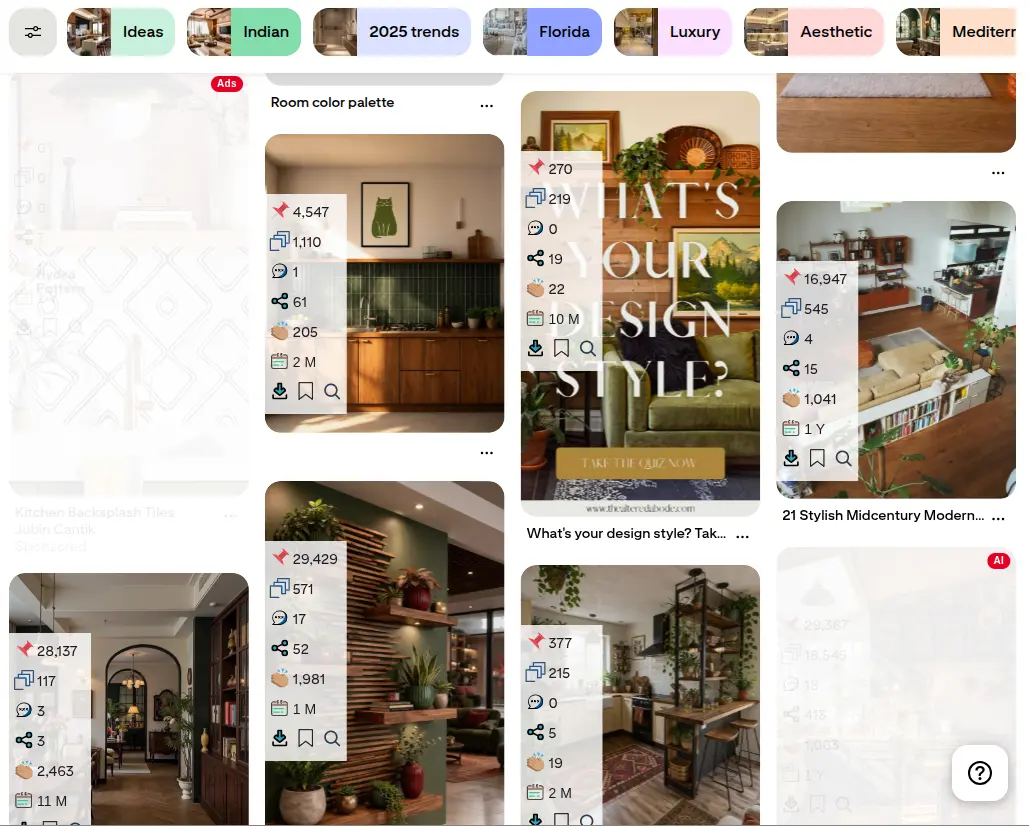
- AI and ad filtering. Fade out promoted pins and AI-generated images so your research reflects organic performance rather than ad spend. Pro.
- CSV and JSON export. Push the table into a spreadsheet for month-over-month comparison or client reporting. Pro.
- Full-resolution media downloads. Save images and video at original quality. Included in the free version.
- Keyword Explorer. Real monthly Pinterest search volumes for a seed keyword plus its long tail, read from what Pinterest itself reports. Free and Pro get a locked preview; full access is Extended Pro.
Here is what the first two look like on a live feed. The same search, before and after the ad and AI filter:
What it costs
Free forever for live stats, basic sorting and downloads. Pro is $21 a year and adds export, advanced filters, full sorting and ad/AI filtering. Extended Pro is $72 a year ($6/month) and adds full Keyword Explorer access. All paid plans carry a 14-day money-back guarantee. Full breakdown on the pricing page.
Best for
Pinterest SEO strategists, e-commerce sellers, bloggers and affiliate creators who want to make content decisions from evidence rather than intuition.
Where it falls short
It reads what is on screen right now. There is no historical tracking, no account-level follower analytics, and no automated competitor monitoring — if you want week-over-week trends you export to CSV and build that yourself. We covered these gaps in detail in our competitor analysis walkthrough.
Two Complementary Tools for the 2026 Stack
Rather than installing several overlapping analytics extensions, pair the research tool above with two extensions built for production steps it does not touch.
Official Save to Pinterest button
- Category: web curation and bookmarking.
- Best for: casual curators, designers and mood-board builders.
- Why use it: it adds a hover "Save" trigger over images on any website, so you can pin straight to a specific board without downloading and re-uploading the image. It also does visual search — hover an image, click the search icon, and Pinterest returns visually similar pins.
- Cost: free. It is Pinterest's own extension, with more than five million users, last updated in July 2026.
Tailwind Publisher extension
- Category: batch scheduling and queue management.
- Best for: publishers pushing meaningful daily volume across Pinterest, Instagram and Facebook.
- Why use it: it grabs every image on a blog post at once and queues them into time slots with their own descriptions and destination links — the difference between scheduling a post's images in one pass and doing it one pin at a time.
- Cost: the extension is free, but it is a front end for the Tailwind app. New accounts get a free trial: 10 scheduled pins and 5 keyword searches; allowances do not renew monthly. Tailwind's Pin Scheduling & Creation plan costs $17.99 a month billed annually ($215.88 a year), or $29.99 billed monthly, per Pinterest account. Pricing checked October 5, 2026. Its older Pro, Advanced and Max plans became legacy plans on September 25, 2026: closed to new subscribers, while existing subscribers keep their terms.
There is also a free route that needs no extension: Pinterest's own bulk upload schedules up to 200 pins per CSV file, each with its own publish date. Our free Pinterest CSV checker lists the rows that would fail before you upload the file.
Extension Comparison Matrix
| Feature | Pin Stats & Sort | Save to Pinterest | Tailwind Publisher |
|---|---|---|---|
| Primary category | Analytics, sorting & feed cleaning | Web content curation | Scheduling & queue automation |
| Engagement overlays on pins | Saves, repins, likes, comments, dates (free) | None | None |
| Sortable data table | Yes — basic sorting free, any column on Pro | No | No |
| Filter AI & promoted pins | Yes (Pro) | No | No |
| Data export (CSV/JSON) | Yes (Pro) | No | Analytics live in the Tailwind app |
| Save images from any website | No | Yes | Yes, into the scheduling queue |
| Bulk scheduling | No | No | Yes |
| Account login required | No account needed | Pinterest login | Tailwind + Pinterest login |
| Price | Free; Pro $21/yr; Extended Pro $72/yr | Free | Free extension. The app has a one-time trial of 10 pins and 5 keyword searches; Pin Scheduling & Creation $17.99/mo per account billed annually ($29.99 monthly) |
Third-party pricing checked August 2026, Tailwind re-checked October 5, 2026; verify current figures on each vendor's site before purchasing.
The 4-Step Pinterest Workflow
Tools are only worth the toolbar space if they slot into a repeatable loop. Here is how the three fit together across one content cycle.
1. Competitive intelligence and trend research
Tool: Pin Stats & Sort. Search your niche's main keyword on Pinterest, let the extension collect the results, then sort the table by saves (Pro; on the free plan, read the saves on each pin). You are looking for patterns across the top twenty: which visual styles, headline phrasings and layouts repeat. One viral pin is an anecdote; twenty sorted by saves is a brief.
2. Feed cleanup and noise reduction
Tool: Pin Stats & Sort (Pro). Turn on the AI and ad filter so promoted placements and synthetic images stop competing for your attention. What is left is what people organically saved, which is the only thing worth modelling your own pins on.
3. Content capture and curation
Tool: Save to Pinterest. As you browse the web, save reference images and your own blog visuals straight into working boards. This is where a research session turns into a swipe file without a download folder in between.
4. Batch publishing and reporting
Tools: Tailwind, then Pin Stats. Queue your finished designs in Tailwind so they drip out over the week rather than in one burst. For a few pins a week, Pinterest's own free scheduler may be enough; our Pinterest scheduling tools roundup compares the free plans. At month end, export the Pin Stats table to CSV (a Pro feature) and compare it against last month's to see whether the patterns you copied in step 1 actually moved your own numbers. For which analytics tool covers your own pins, your site and everyone else's, see our best Pinterest analytics tools roundup.
How to Vet a Pinterest Extension Before Installing
Extensions run inside your logged-in browser session, which makes them worth a minute of scrutiny. Audit any Pinterest tool against these five criteria.
1. Permission scope
A Pinterest analytics extension needs access to pinterest.com and little else. Be sceptical of one requesting permission to read and change data on all websites — unless it is a web-wide saving tool, where that access is the entire point (the official Save button is the legitimate case).
2. Password isolation
Legitimate extensions read the page you are already viewing in your existing session. Never type your Pinterest password into an extension popup. No tool in this guide asks for one.
3. Data handling
Prefer tools that process data in your browser rather than shipping your browsing behaviour to an external server. Pin Stats needs no account and stores its collected pin table in your browser; the official Save button uses your Pinterest login; Tailwind connects through Pinterest's official partner API.
4. Human browsing speed
Reading data from pages you are already visiting is safe. Aggressive automation — mass following, bulk direct messaging, auto-commenting — is what triggers account limits. Those are different categories of tool, and only one of them puts your account at risk.
5. Update frequency
Pinterest changes its markup regularly, which breaks extensions that read it. Check the "last updated" date on the Chrome Web Store listing — anything untouched for a year is likely reading a version of Pinterest that no longer exists.
Frequently Asked Questions
Is it against Pinterest's rules to see save counts on other people's pins?
Reading data that Pinterest already delivers to your browser when it renders a page is ordinary browsing, not account access. What does cross the line is automation that acts on your behalf at machine speed — mass following, bulk messaging or auto-commenting. None of the tools in this guide do that.
Do I need to pay to see hidden pin stats?
No. Revealing saves, repins, likes, comments and creation dates on any pin is in the free version of Pin Stats, along with basic sorting and full-resolution downloads. What Pro adds ($21/year) is export, advanced filters, sorting by any column and the AI/ad filter.
Can I export Pinterest pin data to a spreadsheet?
Yes, with Pin Stats Pro. Browse the board or search results you care about so the table fills, then export to CSV or JSON and open it in Excel or Google Sheets. That is the practical route to month-over-month tracking, since none of these extensions store history themselves.
Do I need all three extensions?
No — they solve different problems. If you only research and never batch-publish, Pin Stats alone is the stack. If you publish high volume but never analyse competitors, Tailwind alone will do. Install the third only when the second one starts feeling like a bottleneck.
How is this different from Pinterest's own analytics?
Pinterest Analytics is deeper on your own account — impressions, outbound clicks, audience data — and these extensions cannot see any of that. What they add is breadth: engagement numbers on pins you do not own, which Pinterest's dashboard will never show. The two are complements, not substitutes.
Conclusion: Build the Stack Around What You Actually Do
Key takeaways
- Pinterest hides save, repin, comment and date data on pins you do not own — that gap is the entire reason this extension category exists.
- Pin Stats & Sort covers research: free for reading stats and basic sorting, $21/year for export, filters and the AI/ad filter.
- The official Save button covers curation and costs nothing. Tailwind covers scheduling, and its real cost is the app subscription, not the extension.
- Vet anything else against permission scope, data handling and update recency before it joins your toolbar.
Start with one. Install the free version of Pin Stats, search your main keyword, and read the saves on the top results — that single action usually explains more about why your competitors outrank you than a week of reading strategy posts. Add the Save button when your research starts producing a swipe file, and Tailwind when publishing volume becomes the constraint.
The guesswork on Pinterest was always a tooling problem, not a talent one. With the numbers in front of you, it stops being guesswork.
Next step: Install Pin Stats free, open the top search result in your niche, and read the saves on the pins at the top. The pattern behind the winning pins usually shows up in the first screen.