Best Pinterest Keyword Research Tools in 2026

By Ruslan Saifullin, Pinterest analytics developer & founder of Pin Stats • Published September 28, 2026
Key takeaways
- Does Pinterest show keyword search volume? Not next to your search. It publishes monthly counts for interest topics, shows ranges in Ads Manager and a relative 0 to 100 index in Pinterest Trends. Keyword tools differ mainly in which of these numbers they show you, and whether they say where it came from.
- What is the best free Pinterest keyword tool? Pair two. Use Pinterest Trends to time seasonal pins, and a tool that shows real monthly counts to size keywords. Our free Pinterest keyword tool gives 2 searches a day with no signup.
- Is a $29 a month Pinterest keyword tool worth it? Only if you need rank tracking or competitor account views, which is what PinClicks-style suites add. For choosing which keywords to target, a real monthly count and a long-tail list with its own volumes do the job for much less.
- How do I tell whether a keyword is winnable? Search it on Pinterest and read the pins already ranking. Years-old pins with huge save counts mean a hard keyword. Recent pins with modest saves mean an open one. Volume tells you demand; the ranking pins tell you competition.
- When should I use Pinterest Trends? To decide when to publish a seasonal pin, weeks before its curve starts rising. Each Trends line is scaled to its own peak, so do not use it to compare how big two keywords are. Use a monthly count for that.
You spend two hours designing a pin, then give it a title you guessed. Pinterest is a search engine for plans people have not made yet, and with 640 million monthly active users in Q2 2026 (Pinterest Q2 2026 results, SEC filing), the words in that title decide whether anyone finds the pin at all.
The trouble is that Pinterest never prints a search count next to a keyword where a casual user would see it. Every keyword tool fills that gap differently. Some show a real monthly count, some a range, some a 0 to 100 index, and some a number from Google. This guide covers the tools worth using in 2026, free and paid, what kind of number each one actually gives you, and what each costs.
- TL;DR: the stack by budget
- What kind of number is each tool showing you?
- Top pick: free keyword tool and Keyword Explorer
- Pinterest's own free keyword tools
- Paid Pinterest keyword research tools
- Comparison table
- A keyword research workflow
- How to choose a Pinterest keyword tool
- Frequently asked questions
- Conclusion
TL;DR: The Pinterest Keyword Tool Stack by Budget
- $0: the Pinterest search bar for ideas, Pinterest Trends for timing, and our free Pinterest keyword tool for real monthly counts. It allows 2 searches a day with no signup. Full disclosure: the keyword tool is ours.
- About $6 a month: Keyword Explorer on Extended Pro, billed at $72 a year. Full keyword research inside Chrome, with volumes on every keyword it finds.
- $29 a month and up: a web suite with rank tracking, such as PinClicks. Worth it if you need to watch where your pins rank over time.
- One-time purchase: Pin Inspector, a desktop app sold for a single $67 payment.
What Kind of Number Is Each Pinterest Keyword Tool Showing You?
Most roundups compare tools on features and price. The more useful question is what kind of number the tool puts next to a keyword, because that decides what the tool can answer. There are six kinds in use today.
| Kind of number | Where you see it | Good for | Not good for |
|---|---|---|---|
| Monthly count Pinterest publishes | Our free keyword tool, Keyword Explorer | Comparing two keywords' size, picking long-tail targets | Seeing how demand moves through the year |
| Range, such as 10K-100K | Pinterest Ads Manager keyword step | A rough size check | Telling a 12K keyword from a 90K one |
| Relative index, 0 to 100 | Pinterest Trends | Timing seasonal pins | Comparing the size of two keywords |
| Google search volume | Keywords Everywhere, shown inside Pinterest | Checking whether a topic also has Google demand | Sizing Pinterest demand |
| Vendor-claimed exact volume | PinClicks, Pin Inspector, Pinsearch, PinTrends Pro | The rank tracking and competitor views these suites add | Taking on trust without asking where it comes from |
| No number | Search bar suggestions and the guide chips under search | Raw ideas in the words searchers use | Deciding which idea to do first |
A tool that shows a trend line answers when. A tool that shows a count answers how many. Most people buy one and ask it the other question.
Top Pick: InsightPins Free Keyword Tool and Keyword Explorer
These two are ours, so read this section with the scepticism it deserves. Every claim below can be checked against the free tool itself, the Keyword Explorer page and the pricing page. The free tool is for checking a keyword quickly. Keyword Explorer is for researching a whole niche.
What it does
- Real monthly counts. Type a keyword into the free tool and you get the monthly search count Pinterest publishes for that topic, refreshed about weekly. No account and no Pinterest login needed. Free.
- Related and long-tail keywords with their own volumes. The same search returns related topics and longer phrases, each with its own count, so you can see which variations have demand. Free.
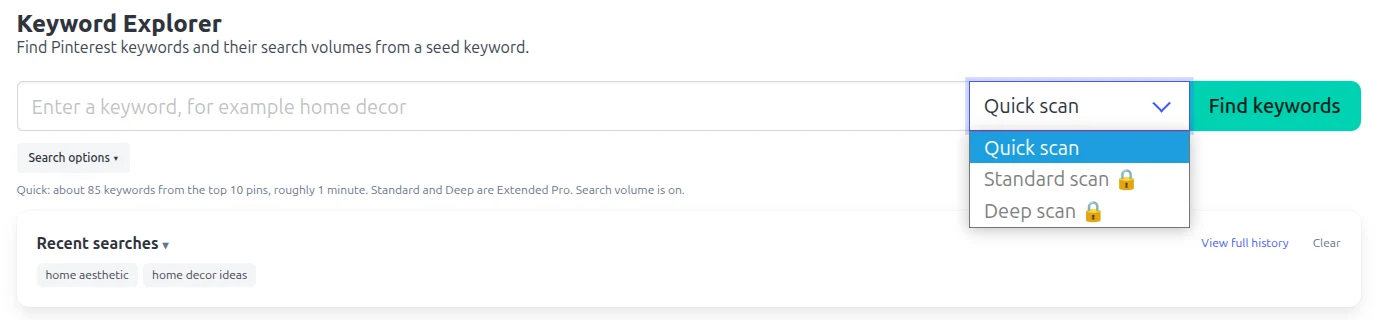
- Keyword Explorer inside Chrome. It scans the top-ranking pins for your seed keyword and pulls out the keywords Pinterest attached to them. It adds five more sources: related interests, related boards, the questions pinners ask, trending searches and Pinterest's own suggestions. Extended Pro.
- Three scan depths. A Quick scan collects about 85 keywords from the top 10 pins in roughly a minute. Standard and Deep scans go further, and Deep expands the long tail up to 100 queries. Standard and Deep are Extended Pro.
- Drill in and export. Click any keyword to pull its own related keywords with volumes, then export the research to CSV or copy it straight into Google Sheets. Extended Pro.
What it costs
The free keyword tool allows 2 searches a day with no signup. That allowance is shared with our other free Pinterest tools. Inside the extension, Free and Pro users see a locked preview of Keyword Explorer. Extended Pro is $72 a year ($6 a month), or $15 billed monthly, and unlocks all of it. Paid plans carry a 14-day money-back guarantee.
Best for
Bloggers, creators and small shops that plan a batch of pins each content cycle and want real counts without a $29 a month subscription.
Where it falls short
It runs in Chrome on desktop only. There is no rank tracking, no volume history and no trend chart, so use Pinterest Trends for timing. There are no saved keyword lists either, although a search history brings back past results. The free tool is built by InsightPins and is not affiliated with or endorsed by Pinterest.
Pinterest's Own Free Keyword Tools
Pinterest gives you three free sources of keyword data. None of them prints a monthly count, but each answers a question the others cannot.
Search bar suggestions and guides
Start typing in the Pinterest search bar and it suggests completions. Search for something and a row of chips, which Pinterest calls guides, appears underneath to narrow it down. Both are a fast way to collect phrases in the words people actually use. Neither shows a number.
One common claim is wrong: the suggestions are not ranked by search volume. Pinterest's help centre says they are based on your interests and what is trending, so your suggestions will differ from someone else's.
Pinterest Trends
Pinterest Trends charts interest in a keyword over roughly the last two years. You can compare up to four terms and filter by region, age, gender, interest and trend type. It is free with a Pinterest business account.
The chart is a relative index. Each line is scaled so its own highest point is 100, which makes it excellent for timing and unreliable for size: two lines can both peak at 100 while one keyword has fifty times the searches of the other. Trends is also no longer limited to the US, UK and Canada, as many older guides say. It now covers around 33 countries; Pinterest keeps the current list on its Trends availability page.
Pinterest Ads Manager keyword step
When you build a campaign in Ads Manager, the keyword targeting step shows how many people search each keyword. It shows ranges, such as 10K-100K, rather than exact counts. You need a business account and an ad account, and you have to start a campaign draft to reach the step, though you never have to launch or pay for it. It is accurate but slow for research, one campaign draft at a time.
Pinterest Predicts
Pinterest Predicts is a yearly trend report, not a keyword tool. The 2026 edition came out on December 9, 2025 with 21 trends and sample searches, but no volumes. We walk through turning it into something usable in how to turn Pinterest Predicts into a keyword watchlist.
Paid Pinterest Keyword Research Tools
Four paid tools cover most of what creators buy. Each is described from its own website; prices were checked in September 2026 and change often, so confirm them before you subscribe.
PinClicks
- Category: web app for Pinterest keyword research and rank tracking.
- Best for: established creators and managers who want to track where their pins rank.
- Why use it: it pairs keyword volumes, which it says come directly from Pinterest, with rank tracking (25 keywords on Pin Pro) and an analysis of the top pins for a search. It is the most complete all-in-one suite in this list. It also has a per-pin lookup it calls "Pin Stats", which is unrelated to our extension, Pin Stats by InsightPins.
- Cost: Pin Pro is $29 a month or $249 a year, and Pin Plus is $49 a month. A short free trial is available.
Tailwind keyword research
- Category: keyword finder built into a scheduling app, plus a free web version.
- Best for: anyone who already schedules pins in Tailwind.
- Why use it: it scores keywords with its own "Resonance score" and shows search volume where it has it. The keyword step then sits right next to the scheduler, so research and publishing happen in one app.
- Cost: the web Keyword Finder needs no account, and the in-app keyword tool is on Tailwind's free plan and unlimited while it is in beta. Expect that to change after the beta.
Keywords Everywhere
- Category: browser extension that adds keyword data to many sites, Pinterest included.
- Best for: bloggers who plan for Google and Pinterest at the same time.
- Why use it: it shows Google search volume inside Pinterest's search bar, plus engagement figures on pins. That tells you whether a topic has demand on Google too. It does not tell you how many people search it on Pinterest, and to its credit, its own site says so.
- Cost: the Pinterest engagement figures are free. Search volume uses credits, sold in annual plans.
Pin Inspector
- Category: desktop app for Windows and Mac.
- Best for: people who would rather pay once than subscribe.
- Why use it: it bundles what it describes as real Pinterest search volumes with trending searches and research on pins, boards and pinners, all in one app.
- Cost: $67 as a one-time purchase, with a 30-day refund window. There is no free tier.
Newer tools worth watching
A handful of smaller tools have appeared recently. Pinsearch is a web app from $27 a month with a trial. PinTrends Pro is a Chrome extension at $7 a month. Keywordtool.io covers Pinterest inside a multi-platform tool, with free suggestions and volumes on its paid plan. They are younger and smaller than the four above, so check how recently each was updated before you rely on it.
Pinterest Keyword Tools Compared
| Tool | Kind of number | Where it runs | Free tier | Paid from | Rank tracking | Best for |
|---|---|---|---|---|---|---|
| InsightPins free tool + Keyword Explorer | Monthly count Pinterest publishes | Web tool; Chrome extension | 2 searches a day | $72/yr ($6/mo), Extended Pro | No | Real counts and long tails on a small budget |
| Pinterest Trends | Relative index, 0 to 100 | Web | Free with a business account | - | No | Timing seasonal pins |
| Ads Manager keyword step | Range | Web, inside a campaign draft | Free; needs an ad account | - | No | Rough size checks |
| Search bar and guides | None | Free | - | No | Ideas in searchers' words | |
| PinClicks | Vendor-claimed exact volume | Web | Short trial | $29/mo or $249/yr | Yes, 25 keywords on Pin Pro | All-in-one research and rank tracking |
| Tailwind keyword research | Resonance score, volume where available | Web app | Free, unlimited during beta | Part of Tailwind plans | Not advertised | Tailwind schedulers |
| Keywords Everywhere | Google search volume | Browser extension | Pin engagement figures | Annual credit plans | Not advertised | Planning for Google and Pinterest together |
| Pin Inspector | Vendor-claimed exact volume | Desktop app | None | $67 once | Not advertised | Paying once instead of monthly |
Third-party pricing checked September 2026 from each vendor's website. Plans and prices change often; confirm them on the vendor's site before you buy.
A Pinterest Keyword Research Workflow That Uses Three of These
A tool only earns its place if it fits into a routine. Here is a five-step routine that uses the free keyword tool, Pinterest itself with Pin Stats, and Pinterest Trends. It runs on one example throughout, using real volumes from our free tool in September 2026. The pins and choices in it are illustrative.
Size the seed keyword
Start with the broad keyword your content is about and check its monthly count. This tells you how big the whole topic is, not what to target.
Worked example · the dinner recipe blog
A food blogger checks dinner ideas: about 8.6 million searches a month. The demand is real, and so is the competition. Millions of established pins already target that exact phrase.
Pick the long tail
Read the long-tail list and pick phrases that have real demand and match something you can actually make. A keyword with a clear constraint (time, budget, protein, season) matches how people search and faces far fewer competing pins.
Worked example · the dinner recipe blog
| Long-tail keyword | Monthly Pinterest searches |
|---|---|
| quick dinner ideas | 662K |
| cheap dinner ideas | 209K |
| high protein dinner ideas | 109K |
| spring dinner ideas | 53K |
The blog has a batch of 20-minute recipes, so quick dinner ideas and cheap dinner ideas go on the shortlist.
Check what already ranks
This is the step most keyword guides skip, and it matters most. Volume tells you how many people search a phrase. Only the pins already ranking for it tell you whether a new pin can win.
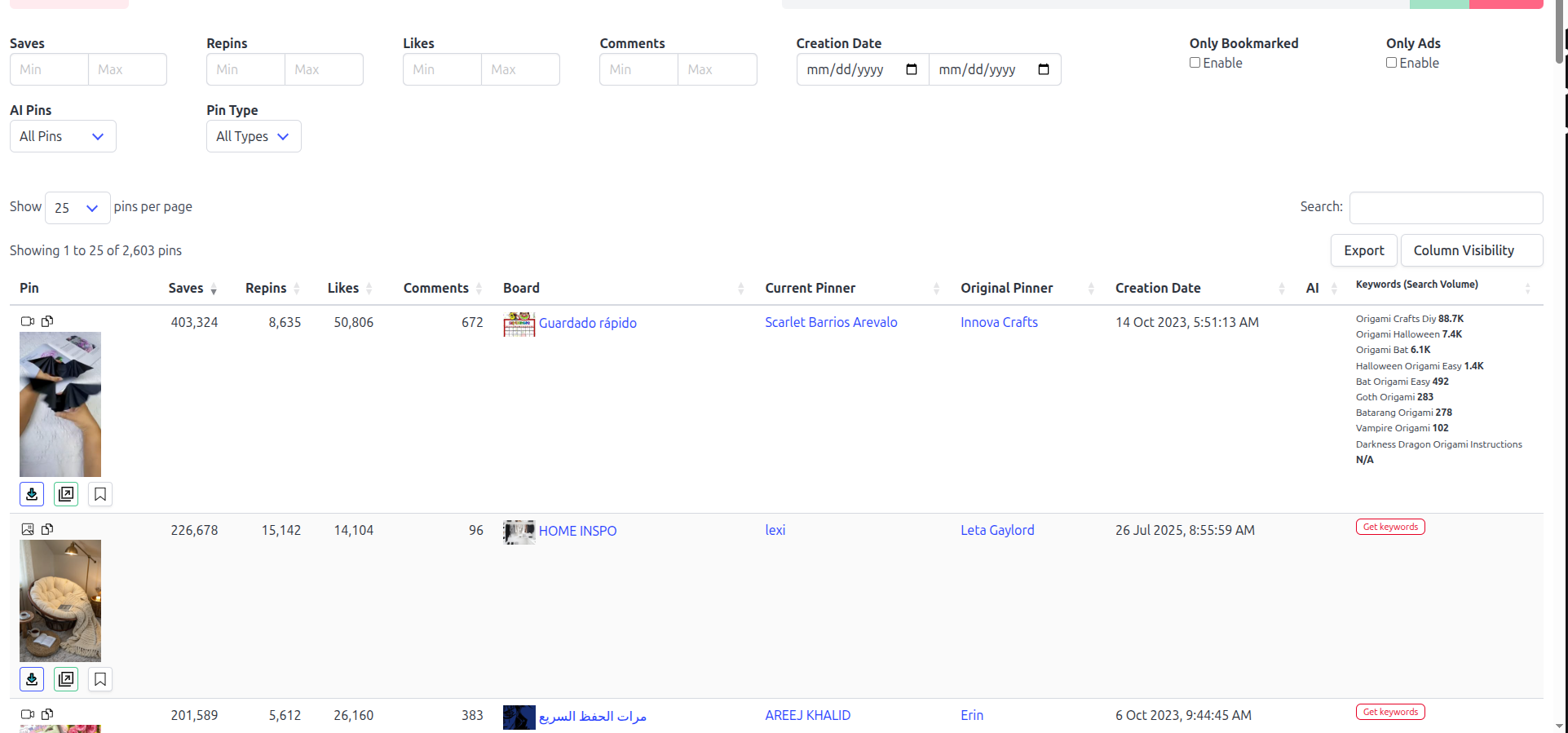
Search the shortlisted keyword on Pinterest and look at the top results. The free Pin Stats extension shows each pin's saves and creation date right on the pin as you scroll, which Pinterest does not show for pins you do not own. Two patterns matter:
- A hard keyword: the top results are pins several years old with tens of thousands of saves. They have held their spots for a long time, and a new pin will struggle to displace them.
- An open keyword: the top results include recent pins with modest save counts. Pinterest is still testing what ranks there, and a well-made pin has a real chance.
Worked example · the dinner recipe blog
If the top results for quick dinner ideas are dominated by old pins with huge save counts, while cheap dinner ideas shows several pins from this year with a few hundred saves, the blogger starts with cheap dinner ideas. Its volume is lower, but the pin can actually be seen.
Time it with Pinterest Trends
For any keyword with a season in it, open Pinterest Trends and look at when its curve starts to rise. Publish a few weeks before that point, so the pin has time to be distributed before demand peaks. Evergreen keywords can go out any time.
Worked example · the dinner recipe blog
spring dinner ideas is seasonal by definition. The blogger checks when its line climbs in Trends and schedules those pins ahead of it, rather than publishing them the week spring starts.
Put the keyword where Pinterest reads it
Use the chosen phrase in the pin title, in the first sentence of the description and in the name of the board you save it to. Keep the wording as close as you can to what people type; Pinterest matches on language, and the long-tail phrase you chose is the language.
Want to try this on your own niche? Run your main keyword through the free Pinterest keyword tool and start from its long-tail list.
How to Choose a Pinterest Keyword Tool
Whatever you consider, run it through five checks before you pay for it.
- It says where its numbers come from. A count, a range, an index and a Google figure are different things. A tool that will not tell you which one it shows is asking for trust it has not earned.
- It covers your country. Pinterest demand differs by market. Check that the tool reports data for the audience you actually pin for.
- It refreshes often enough. Seasonal niches move fast. Weekly data is fine for planning; a figure that has not changed since last year is not.
- It costs less than it earns you. If you publish a few pins a week, a $29 a month suite is a big share of what those pins are worth. Match the price to your volume.
- It fits where you already work. A browser extension suits research while you browse Pinterest. A web app suits planning sessions. A desktop app suits one computer. Pick the one you will actually open.
Building an app or a spreadsheet on Pinterest keyword data rather than choosing a tool for your own pins? Our Pinterest keyword search volume API guide covers the endpoints, access and pipeline design.
Frequently Asked Questions
Does Pinterest show keyword search volume?
Not next to a search. Pinterest publishes monthly search counts for its interest topics, shows ranges in the Ads Manager keyword step, and shows a relative 0 to 100 index in Pinterest Trends. Keyword tools differ mainly in which of these they surface.
Can I use Google keyword data for Pinterest?
As a secondary signal, yes. Google volume tells you whether a topic has demand on Google, which is useful if you blog for both. It does not tell you how many people search the phrase on Pinterest, where people search earlier in a plan and phrase things differently.
Is Pinterest autocomplete ranked by search volume?
No. Pinterest's help centre says search suggestions are based on your interests and what is trending, so they are personalised. Treat them as a source of phrasing, and check the volume of any phrase you like with a tool that shows a count.
Do I need a paid tool if I pin a few times a week?
Usually not. The Pinterest search bar, Pinterest Trends and a free tool that shows monthly counts cover keyword choice for a light publishing schedule. Paid tools earn their cost when you publish at volume or need rank tracking.
What is the difference between Pinterest Trends and a keyword tool?
Pinterest Trends shows how interest in a keyword moves over time, with each line scaled to its own peak. A keyword tool shows how many people search it in a month. Use Trends to decide when to publish, and a keyword tool to decide what to target.
Conclusion: Pick the Tool That Answers Your Question
| If you need to know | Use |
|---|---|
| How many people search a keyword | A tool that shows the monthly count Pinterest publishes |
| Which variations have demand | A long-tail list with volumes, such as the free keyword tool or Keyword Explorer |
| Whether a new pin can rank | The pins already ranking, read with Pin Stats |
| When to publish a seasonal pin | Pinterest Trends |
| Where your pins rank over time | A rank-tracking suite such as PinClicks |
Start free. Size your main keyword, take its long tail, check what already ranks for your best two phrases, and time anything seasonal with Trends. Pay for more only when a free tool becomes the bottleneck: Keyword Explorer when you are researching whole niches each week, a rank tracker when you need to watch positions.
Keyword research on Pinterest was never about finding one magic phrase. It is about knowing which number you are looking at, and letting the right number make each decision.
Next step: type your main keyword into the free Pinterest keyword tool and read its long tail. The phrase for your next pin is usually in the first ten rows.